
Quick Answer
Excessive dust from a granulator is most commonly caused by improper knife gap, dull knives, screens that are too small, worn screens, material characteristics, poor material evacuation, or machine setup issues. According to Cumberland representatives, the knife gap is often one of the most important factors. When material is torn instead of cleanly sliced, dust and fines can increase, reducing regrind quality and process efficiency.
If your granulator is producing more dust or fines than usual, it can affect regrind quality, material reuse, housekeeping, and process efficiency. While some dust is expected during size reduction, excessive dust often indicates that machine setup, cutting components, screen selection, evacuation, or maintenance practices need attention.
The goal is not simply to reduce scrap size. The goal is to produce reusable regrind that is consistent, properly sized, and clean enough to return to the process whenever possible.
Why Granulator Dust Happens
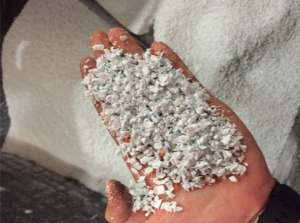
Every material will produce some level of dust or fines during the granulation process. The goal is not always to eliminate dust completely, but to minimize excessive dust through proper equipment setup, maintenance, and process control.
Dust and fines often increase when material is not being cleanly cut. Instead of being sliced efficiently between the rotor and bed knives, the material may be torn, fractured, or cut repeatedly inside the chamber. This can reduce regrind quality and lower the amount of usable material that can be returned to the process.
According to Cumberland representatives, quality regrind depends on minimizing excessive dust and fines, maintaining proper particle size, preserving granulate condition, and keeping contaminants out of the process.
1. Improper Knife Gap
One of the most common contributors to excessive dust is improper knife gap.
The clearance between the rotor knives and bed knives plays a major role in how cleanly material is cut. If the gap is too large, the machine may tear or fracture the material instead of slicing it cleanly. This can create more fines, inconsistent granules, and added stress on the machine.
Based on Cumberland field experience, knife gap can be even more critical than knife sharpness in some applications. In certain cases, a knife that is not perfectly sharp may still perform acceptably if the knife gap is properly maintained. However, a poor knife gap can create cutting problems even when knives appear to be in decent condition.
For processors experiencing excessive dust, the knife gap should be one of the first areas inspected. Knife gap and knife condition work together. A poorly adjusted knife gap can create dust even when knives are reasonably sharp, while dull knives can reduce cutting efficiency even when the knife gap is properly maintained.
2. Dull Knives
Dull knives are another major reason granulators produce excess dust.
Sharp knives create a cleaner cutting action. As cutting edges wear, material is more likely to tear, fracture, or remain in the cutting chamber longer than necessary. This can increase dust and fines while reducing the quality of reusable regrind.
Dull knives can also contribute to higher amp draw, increased vibration, and additional wear on critical machine components. When the machine has to work harder to cut material, overall efficiency can suffer.
Regular knife inspection, sharpening, and proper gap setting should be part of a preventive maintenance program that is specific to the application.
3. The Screen Size Is Too Small
In many applications, excessive dust generation can be traced back to retention time inside the cutting chamber. Factors such as screen size, screen condition, and material evacuation all influence how quickly material exits the machine.
Screen size has a direct impact on dust generation.
The smaller the screen hole diameter, the longer material typically stays inside the cutting chamber. Longer retention time means the material may be cut more times before it exits the machine. More cuts can generate more dust.
Cumberland representatives recommend using the largest screen size allowable for the next step in the process. This helps material exit the cutting chamber sooner while still producing regrind that meets downstream requirements.
That does not mean the largest screen is always the correct choice. The right screen size depends on the material, machine configuration, desired particle size, throughput requirements, and how the regrind will be reused. However, if a granulator is producing excessive fines and the screen hole size is very small, screen selection should be evaluated.
4. Worn or Damaged Screens
Screen condition also plays an important role in regrind quality and throughput.
A worn or damaged screen can affect how efficiently material exits the cutting chamber. If screen openings are worn, blocked, or damaged, material may remain in the chamber longer than intended. This can lead to additional cutting, inconsistent granules, reduced throughput, and more fines.
Cumberland representatives have seen applications where worn screen condition contributed to reduced throughput, and rotating or replacing the screen helped restore performance.
If dust or throughput issues develop, operators should inspect the screen for wear, plugging, damage, or signs that material is not passing through properly.
5. Material Characteristics
Some materials naturally generate more dust than others.
Materials with fillers may produce more dust during processing. Friable materials, such as PVC, PET, and ABS, can also create more dust than softer materials such as PP, PE, and HDPE.
This does not always mean something is wrong with the granulator. It means that the machine setup, screen selection, knife condition, knife gap, and evacuation method need to match the material being processed.
For dust-prone materials, regular maintenance becomes even more important. Maintaining the correct knife gap, keeping knives sharp, inspecting screens, and ensuring proper evacuation can help reduce excessive fines and improve final regrind quality.
6. Poor Material Evacuation
Evacuation methods can also affect dust generation and regrind quality.
Once material passes through the screen, it needs to be removed efficiently from the machine. If regrind builds up under the screen or does not move away from the cutting chamber properly, throughput can decrease and overall performance may suffer.
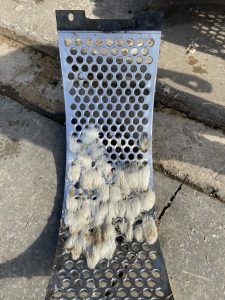
Evacuation methods may include blowers, bins, vacuum take-off systems, augers, or other configurations depending on the application.
If dust levels seem excessive, it is worth asking:
- Is material evacuating from the granulator properly?
- Is regrind building up under the screen?
- Is the airflow or damper setting correct?
- Is the evacuation setup appropriate for the material and throughput rate?
- Where is the dust being measured or observed after the granulator?
These questions can help determine whether the dust issue is happening inside the granulator or elsewhere in the material handling process.
7. Incorrect Machine Setup
When troubleshooting excessive dust, it is important to confirm that the machine is set up correctly.
Cumberland representatives recommend reviewing the basics first, including rotor rotation, evacuation setup, knife condition, knife gap, and screen condition. If one of these fundamentals is off, regrind quality can suffer.
Before making larger equipment changes, processors should verify that the granulator is installed, configured, and operating correctly for the application.
How to Troubleshoot Excessive Dust in a Granulator
When a granulator produces excessive dust, start with the fundamentals.
Check the Knife Gap
Knife gap should be one of the first items inspected. A gap that is too large can prevent clean cutting and cause material to tear instead of slice.
Inspect Knife Condition
Determine when the knives were last changed or sharpened. If knives are dull, damaged, improperly sharpened, or uneven, the machine may not maintain the proper gap across all knives.
Review Screen Size and Screen Condition
Evaluate whether the screen hole size is appropriate for the next step in the process. Also inspect the screen for wear, plugging, or damage.
Confirm Proper Evacuation
Check whether material is being removed from the granulator efficiently. If regrind is building up under the screen, airflow or damper settings may need attention.
Verify Machine Setup
Confirm rotor rotation and review the installation. If knives and screens have been ruled out, look at other areas where dust may be generated or collected after the granulator.
Maintenance Practices That Help Reduce Dust
A strong preventive maintenance program helps reduce excessive dust, improve regrind quality, and maintain overall granulator performance.
Best practices include:
- Develop a knife preventive maintenance schedule based on the specific application.
- Maintain proper knife gap so material is cut or sliced rather than torn apart.
- Sharpen or replace knives before performance declines significantly.
- Inspect screens for wear, plugging, or damage.
- Use the largest allowable screen size for the next step in the process.
- Monitor amp draw and vibration for signs of changing machine performance.
- Confirm that the evacuation method is properly moving regrind away from the chamber.
- Keep contaminants out of the scrap stream whenever possible.
Cumberland representatives emphasize that maintenance directly affects uptime, regrind quality, motor efficiency, and long-term equipment performance.
When Excessive Dust Points to a Larger Issue
If knives, knife gap, screens, and evacuation have all been reviewed and dust is still excessive, the issue may be related to a larger equipment or process concern.
At that point, processors should evaluate:
- The full installation
- The evacuation method
- Where material goes after the granulator
- Where dust is being observed
- Whether dust is being generated in the granulator or downstream
- Whether the machine is properly sized and configured for the application
In some cases, repeated dust issues may point to worn components, incorrect equipment selection, or an aging granulator that needs more than routine maintenance.
For processors operating older equipment, Cumberland’s Granulator Refurbishment Program can help restore performance, reliability, and safety features through inspection, remanufacturing, and replacement of worn components.
Keep Regrind Quality in Focus
Excessive dust is often a symptom rather than the root problem. Proper machine setup, routine maintenance, efficient material evacuation, and well-maintained cutting components can significantly improve regrind quality while reducing dust and fines.
If inspection reveals worn knives, damaged screens, or other worn cutting components, using properly specified OEM replacement parts can help restore cutting performance and maintain consistent granulate quality. Parts and service assistance remain available through Cumberland’s support team.